You're alone in a hotel room after midnight, and strangers are knocking. Some need help; some are lying. This keep the door locked beginner guide teaches you the core loop, controls, and verification tricks so you can survive your first shift instead of becoming another cautionary tale.
The game launched on Roblox on May 28, 2026, and has already racked up 4.3M+ visits with over 10K players online at peak hours, according to the official Keep the Door Locked Roblox page. That popularity means the community is actively mapping out anomaly behaviors, visitor patterns, and optimal strategies every week. This guide consolidates what new players need to know right now, whether you're playing on PC or mobile.
Understanding the Core Loop Before Your First Knock
The entire game revolves around a simple tension: people knock, and you decide who gets in. But the simplicity hides layers of deception, because some visitors are anomalies that mimic human behavior to trick you into opening the door. Your job as a night clerk is to verify every visitor before you unlock that door, using the tools available in your room.
The basic loop breaks down into four repeating steps: locate the threat, barricade the door, manage resources, and survive the night. Each cycle tightens tension as players must prioritize which door to reinforce, knowing that a single misstep can drain precious stamina or attract unwanted attention. Veterans often note that mastering the rhythm of these steps is the key to outlasting the entity's relentless pressure.
-
Listen for the knock — every visitor announces themselves with a distinctive knock pattern, and the first one usually comes early in the night.
-
Check the camera feed — before you even touch the door, cycle through the hallway cameras to see who is standing outside your room.
-
Verify the visitor's story — each visitor gives a reason for being there, and you need to compare that story against what the camera shows and what you know about the hotel.
-
Decide: open or ignore — if the story checks out, you can safely unlock the door; if anything feels off, keep the door locked and wait for them to leave.
This loop repeats throughout the night, but the stakes rise as the hours pass because anomaly frequency increases as dawn approaches. According to community testing, the first two hours are relatively calm, while the final stretch before 6 AM can throw multiple anomalies at you in quick succession.
The key insight for beginners is that speed kills. Players who rush to the door without checking the camera feed are the ones who get caught by impostors. The game rewards methodical, patient play, which is why our survival guide emphasizes building a consistent pre-knock routine before anything else.
Keep the Door Locked Controls and Settings for New Players
Before you can survive the night, you need to master the interface. The keep the door locked controls are straightforward, but knowing them cold makes the difference between a smooth verification and a panicked fumble when an anomaly is at your door.
Here's the control layout that most players use on PC: WASD handles movement, Shift lets you sprint, and E interacts with doors and items. Since the monster reacts to sound, players often crouch with Ctrl to move silently, while Space is reserved for quick dodges. Many veterans rebind F to the flashlight for faster switching during chases.
| Action | Default Key | Notes |
|---|---|---|
| Move | WASD | Standard movement around the room |
| Interact / Open Door | E | Hold to unlock, release to lock |
| Camera Monitor | Tab | Opens the camera interface |
| Cycle Cameras | Q / E | Switch between hallway feeds |
| Night Vision Toggle | N | Essential for dark hallway checks |
| Lock Toggle | Space | Quick lock/unlock without opening the door |
| Pause Menu | Esc | Access settings and quit |
Mobile players get a simplified touch interface, and the keep the door locked mobile controls replace keyboard inputs with on-screen buttons. The camera monitor is accessed via a dedicated icon, and you swipe to cycle between feeds. Community reports suggest mobile players should enable the "Hold to Interact" option in settings, because accidental taps can unlock the door at the worst possible moment.
Before your first shift, spend five minutes in the settings menu adjusting these options: sensitivity, volume, and brightness. A higher sensitivity helps you react faster when the door creaks, while lowering volume prevents audio cues from startling you mid-check. Many players also toggle the flashlight to manual, saving battery during long night stretches.
-
Graphics quality — the game runs on Roblox's engine, so lower settings reduce visual clutter and make anomaly tells easier to spot on the camera feed.
-
Audio volume — keep sound effects high because audio clues like footsteps and breathing are critical for detecting anomalies outside your door.
-
Camera sensitivity — find a comfortable balance; too high makes the camera swing wildly, too low makes quick checks frustrating.
-
Safe mode — this optional setting dims flashing lights and reduces sudden loud noises, which helps players sensitive to jump scares stay calm during verification.
The keep the door locked settings guide on our site covers these options in more detail, but the core advice is to test your setup on the first night before committing to a long run. You want the controls to feel automatic, because your attention needs to stay on the visitors, not on fumbling with keybinds.
Building Your Pre-Knock Verification Routine
The single most important habit you can develop is a pre-knock routine that you execute every single time someone arrives. Veteran players swear by this because it eliminates the panic that leads to mistakes, and it ensures you never skip a critical verification step when an anomaly is trying to trick you.
Here's the routine that most successful players follow, based on community guides and walkthrough videos: they prioritize locking the main door first, then cycle through side windows while watching the audio cue for the creature's approach. Veterans also recommend saving the flashlight for late-game darkness, since overusing it early can attract unwanted attention. This pacing keeps resources stable and nerves manageable.
Step 1: Freeze and Listen
When you hear the knock, stop moving immediately. Listen carefully to the knock pattern itself, because anomalies often knock with an unnatural rhythm or at odd intervals. A human visitor typically knocks three times in a steady pattern; anomalies might knock twice, pause, then knock once more, or produce a hollow, echoing sound that doesn't match the hallway acoustics.
Step 2: Camera Sweep
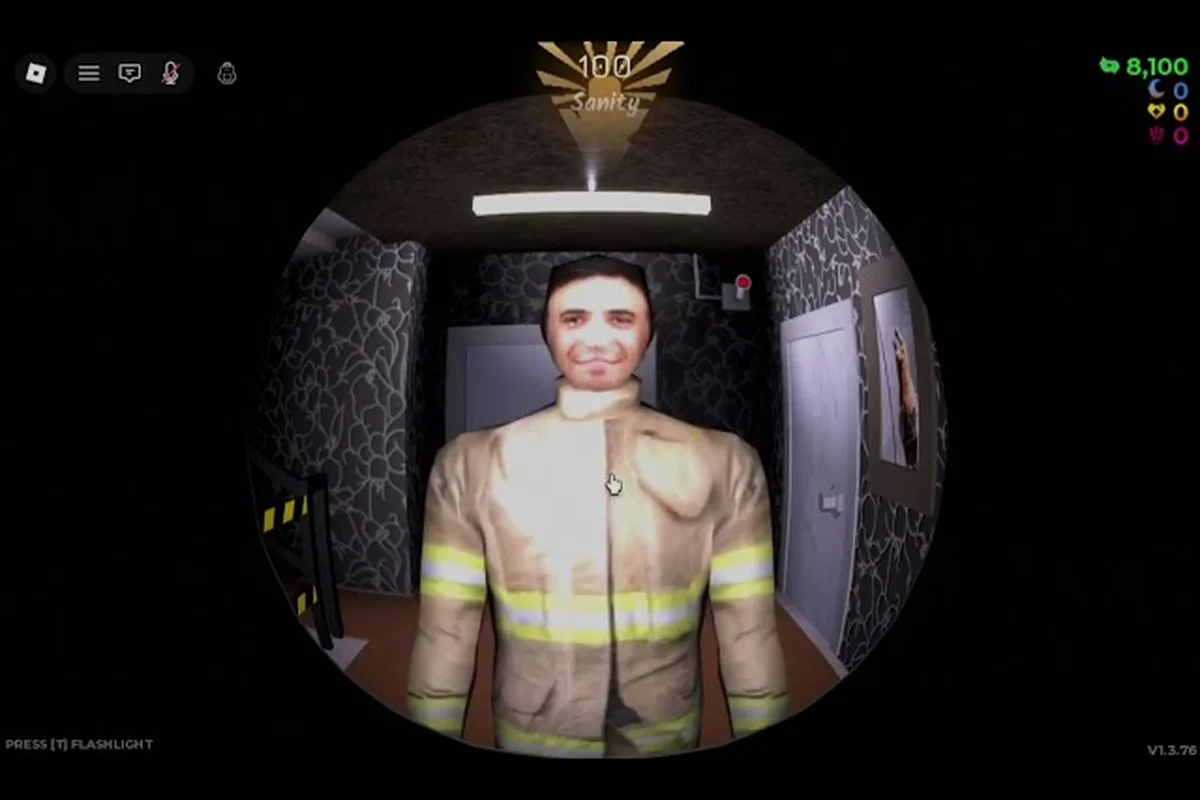
Open the camera monitor and cycle through the feeds to locate the visitor. Pay attention to how they stand, whether they look at the camera, and whether their body language matches their stated purpose. A person claiming to be a maintenance worker should be holding tools or wearing a uniform; someone claiming to be a guest should have luggage or a key card visible.
Step 3: Cross-Reference the Story
Every visitor gives a reason for knocking, and you need to check that reason against what you know. If someone claims to be from room 204 but the camera shows them arriving from the stairwell, that's suspicious. If they claim to be a police officer but their uniform looks wrong, that's a red flag. The game rewards critical thinking about details, not just surface-level checks.
Step 4: Decide and Act
Once you've completed your verification, make your decision and commit to it. If you're confident the visitor is safe, unlock the door and interact with them. If anything feels off, keep the door locked and wait. Don't second-guess yourself, because hesitation gives anomalies more time to manipulate you.
This routine takes about 15 seconds per visitor when you practice it, which is well within the time window before visitors get impatient and leave. The keep the door locked walkthrough videos on YouTube, like this full guide by VendoPlus, show the routine in action and demonstrate how smooth it becomes with practice.
Which Visitors Are Human Versus Which Are Not
Not every visitor is trying to kill you, and learning to distinguish safe visitors from anomalies is the heart of the game. Safe visitors have logical stories, consistent behavior, and appropriate appearances. Anomalies, on the other hand, slip up in small ways that you can catch if you're paying attention.
Here's a comparison table based on community documentation and player reports, which consolidates observed differences in door behavior, monster spawn rates, and audio cues across updates. Players frequently reference this data to time their lock interactions, especially during the late-game rush, though some entries remain contested due to inconsistent patch notes.
| Trait | Safe Visitor | Anomaly |
|---|---|---|
| Knock Pattern | Steady, rhythmic, expected | Irregular, hollow, or too fast |
| Camera Behavior | Looks at camera naturally | Avoids camera or stares unnaturally |
| Story Logic | Matches hotel context | Contradicts itself or makes no sense |
| Movement | Normal walking speed | Jerky, gliding, or too slow |
| Voice Quality | Clear, human, emotional | Robotic, distorted, or monotone |
| Reaction to Delay | Waits patiently, knocks again politely | Gets aggressive, threatens, or pleads excessively |
The most common beginner mistake is trusting a visitor's voice, because anomalies are designed to sound convincing. They can mimic distress, authority, and friendliness, which is why you need to verify with your eyes, not just your ears. The camera feed is your best tool because it shows you what the visitor looks like, and visual tells are harder for anomalies to fake than vocal ones.
According to player reports from the community, some of the most dangerous anomalies include the Rush variant that accelerates unpredictably in hallways, forcing players to time their locker hides precisely. Veteran survivors often note that Ambush doubles back, punishing those who exit too early, while Dupe mimics door sounds to bait careless closets. These threats demand constant audio awareness and quick map memorization to survive.
-
The Mimic — copies the appearance and voice of a previous safe visitor you let in, making it nearly impossible to distinguish without careful attention to details.
-
The Officer — appears as a police officer with a plausible story about a disturbance, but the uniform details are subtly wrong when you look closely.
-
The Child — uses a child's voice to trigger protective instincts, but the figure on camera is too tall or moves too stiffly to be a real child.
For a complete breakdown of every known anomaly type, check our anomaly guide, which catalogs the visual and audio tells for each creature. That guide is updated as the community discovers new patterns, so it's worth bookmarking for reference. Players often cross-check the guide mid-run when a door creaks or a shadow flickers, since distinguishing a false trigger from a real threat can mean the difference between survival and a sudden jumpscare.
Keep the Door Locked Beginner Tips for Surviving the Full Night
Surviving your first night requires more than just knowing the mechanics; you need a survival mindset that keeps you calm and focused as the hours drag on. The game is designed to wear you down, both through jump scares and through the psychological pressure of making life-or-death decisions repeatedly.
Here are the keep the door locked beginner tips that experienced players wish they knew from the start: prioritize barricading early, as the entity’s spawn timer is unforgiving. Always listen for the distinct creak before footsteps, and save your flashlight battery for the final minutes. Veterans also recommend never unlocking the door to check the hallway—it resets your progress and invites an instant chase.
-
Don't open the door for anyone you haven't verified — this seems obvious, but panic makes people skip steps. Commit to your routine no matter how desperate the visitor sounds.
-
Use night vision on every camera check — the hallway is dark, and anomalies hide in shadows. Night vision reveals details that standard cameras miss, like unnatural posture or missing features.
-
Trust your gut when something feels wrong — if a visitor's story technically checks out but something about them unsettles you, that's your brain noticing a tell you haven't consciously processed. Keep the door locked.
-
Manage your mental energy — the game is exhausting, and fatigue leads to mistakes. Take breaks between runs, and don't play for hours on end if you want consistent performance.
-
Learn from every death — when you get caught, pay attention to what you missed. The game shows you the anomaly's true form after you die, which is valuable information for future runs.
One of the most important things to understand is that safe visitors can become dangerous if you keep them waiting too long. According to community testing, visitors who are left outside for extended periods may become hostile, and some anomalies use this mechanic to pressure you into opening the door. The solution is to complete your verification efficiently and make a decision within a reasonable time window.
The keep the door locked game guide community on Roblox has also documented several hidden features that new players often miss. For example, the room contains a notebook that fills with information about visitors you've encountered, and reading it between knocks can reveal patterns that help with future verifications. There's also a radio that occasionally broadcasts hints about the night's anomaly activity, though the signal is often static-filled and hard to decipher.
Is Keep the Door Locked Worth Playing in 2026?
If you're wondering whether this game deserves your time, the answer depends on what you're looking for. Keep the Door Locked is worth playing if you enjoy psychological horror games that reward observation and deduction rather than reflexes. It's less about jump scares and more about the creeping dread of not knowing who to trust, which makes it a unique entry in the Roblox horror genre.
The game's popularity speaks for itself: 4.3M+ visits and 10K+ concurrent players within months of launch suggest a strong community and active development. The developer, Hotel Room Services, has been responsive to player feedback, and the latest update notes show regular patches that address both bugs and balance issues.
Here's a quick breakdown of what the game offers different types of players: Survivalists will focus on managing the door's durability and rationing repairs, while speedrunners prioritize memorizing the entity's spawn patterns to minimize risk. Casual players can still enjoy the tense atmosphere by hiding in closets, though this leaves them vulnerable to the peek mechanic that punishes excessive observation.
| Player Type | Verdict | Reason |
|---|---|---|
| Horror Fans | Highly Recommended | Genuine tension and atmosphere without relying on gore |
| Puzzle Lovers | Recommended | Deduction and pattern recognition are core skills |
| Casual Players | Worth Trying | Short sessions work well; you can play one night in 30 minutes |
| Completionists | Very Recommended | Multiple endings and hidden content reward thorough play |
| Speedrunners | Interesting Challenge | The any% route requires mastering anomaly tells quickly |
The keep the door locked story explained by the community reveals a surprisingly deep narrative hidden beneath the gameplay. The hotel has a dark history, and the anomalies you encounter are connected to events that happened there long ago. Piecing together the story requires multiple playthroughs and careful attention to environmental details, which adds replay value for players who want to understand the full picture.
For players chasing 100 percent completion, the game offers multiple endings that depend on your choices throughout the night. Our ending guide breaks down the requirements for each ending, but the short version is that your decisions about who to let in and who to turn away directly affect which conclusion you reach. This creates meaningful replayability because no two runs play out exactly the same way.
Frequently Asked Questions
What is the best strategy for the first night in Keep the Door Locked?
Be conservative on the first night: verify every visitor through the camera feed, trust your routine, and keep the door locked if you have any doubt. Most beginner deaths come from rushing to open for urgent-looking visitors who are anomalies. Focus on learning the tells instead of maximizing interactions.
How do I unlock the good ending in Keep the Door Locked?
The good ending requires you to survive the entire night while making correct decisions about which visitors to admit. You need to let in all safe visitors, turn away all anomalies, and maintain your sanity by following the rules consistently. Missing even one anomaly can lock you out of the best ending, so precision matters more than speed.
Can I play Keep the Door Locked on mobile?
Yes, the game supports mobile devices with touch controls that replace the keyboard inputs. The mobile interface includes on-screen buttons for camera cycling, night vision, and door locking. Community reports suggest mobile play is slightly harder due to slower camera movement, but it's entirely viable with practice and the right settings adjustments.
What happens if I open the door for an anomaly?
Opening the door for an anomaly triggers a jump scare and ends your run immediately. The anomaly reveals its true form, and the screen cuts to a death screen showing what you missed. This information is valuable for future runs because you learn the specific tells that should have alerted you to the danger.
How long does a full night take in Keep the Door Locked?
A full night lasts approximately 30 to 40 minutes of real time, depending on how many visitors knock and how long you take to verify each one. The game doesn't have a pause function, so plan your sessions accordingly. Speedrunners have completed nights in under 20 minutes by optimizing their verification routines and making snap decisions.